
< Previous | Contents | Next >
Composition Instance
A Composition may also store settings, attributes, and persistent metadata. While the Fusion instance holds Global Settings, each composition may have an individual set of settings. This behaviour is mimicked in the preferences dialog, where either global settings for each new composition, or individual settings of currently opened compositions can be changed. Most of the time the composition settings should be accessed to include the overrides for the current composition. This includes the PathMapping, which is used to identify paths from Fusion’s relative path system.
The composition can be Saved and Closed, create Undos, Undo actions, and Redo them and Clear Undos altogether. Also, playback and rendering can be invoked from a composition.
Please note that you can comp:Lock() a composition, which prevents re-rendering due to changes and dialog pop-ups until the composition is unlocked again with comp:Unlock(). Use locking whenever possible if you manipulate the composition. You can query the lock state of a composition via comp:IsLocked().
Note
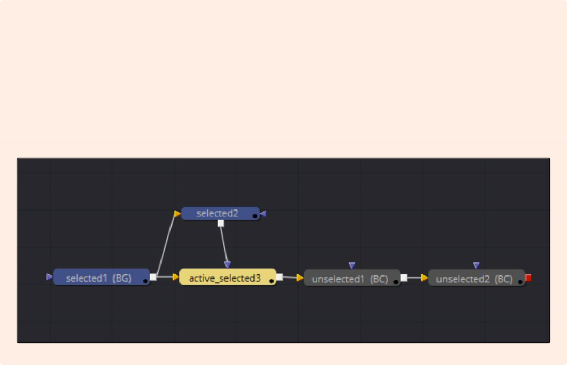
Fusion tools can have three selection states: unselected, selected and active & selected .
While the selected tools are the ones drag-selected (indicated by a blue color), the active tool is the last clicked tool (indicated by a yellow color). Still, an active tool is also automatically selected.
This behaviors enables a finer selection, e.g., when you want to copy one tool’s settings to other tools, you can drag select all the target tools and then activate the source tool by clicking on it.
Tools on the composition can be queried. A composition can get and set the currently active tool via comp.ActiveTool and comp:SetActiveTool(tool). All tools within the composition are queried with comp:GetToolList() while only the selected tools a queried with comp:GetToolList(true).

flow:Select(Blur1, true)
-- Adds blur1 to the selection
flow:Select(Blur2, false)
-- Removes blur2 from the selection
-- Deselects all
flow:Select()
flow = comp.CurrentFrame.FlowView
Selection of tools is part of the FlowView and can be triggered like this:
Both composition and fusion have GetPrefs() and SetPrefs(), which store the preferences of Fusion and the local copy of the composition. If you cannot find a particular setting in there, take a look inside the Attributes as described later on.
