< Previous | Contents | Next >
MainInputs and MainOutputs
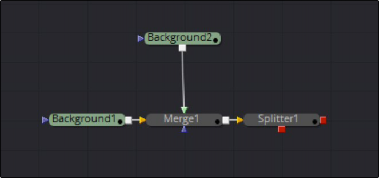
In general, tools have Inputs and Outputs. Property Inputs—being represented by controls in the properties view (e.g. the Gain slider in a ColorCorrector)—or the Inputs on the flow view that connect one tool to the other, so called MainInputs. Outputs are very similar although most of the time tools only have one MainOutput on the FlowView. An exception being the Stereo Splitter (Fusion Studio) as shown in the figure.
The distinction if an Input or Output is on the flow is made by defining them as MainInput and MainOutput during the development of the Plugin or Fuse.
Visible MainInputs can be queried by using tool:FindMainInput(i), while MainOutputs are available with tool:FindMainOutput(i). As there can be more than one MainInput or MainOutput, these methods require an argument i starting with 1.
out = (tool:FindMainInput(i))
if out == nil then break end
while(true) do
local i = 1
If there is no result for the given index, the method returns nil. The following snippet shows how to query all MainInputs and MainOutputs of the active tool:
tool = comp.ActiveTool
if(tool ~= nil) then
print (tool.Name)


out = (tool:FindMainOutput(i)) if out == nil then break end
print(string.format(“\tMainOutput %d: %s”, i, out.Name))
i = i + 1
while(true) do
i = 1
end
end
end
i = i + 1
print(string.format(“\tMainInput %d: %s”, i, out.Name))