< Previous | Contents | Next >
Sliders
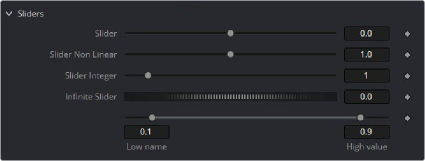
Sliders are used to provide parameter inputs, and produce a number.
Sliders can be integer or floating point, can also be a fixed range or unlimited range, can be scaled or fixed scale, can have fixed limits and can also operate non linearly.
-- Slider Control returns a number
InSliderB = self:AddInput("Slider Non Linear", "SliderN", { -- UI Label, Internal Ref
LINKID_DataType = "Number", -- returns a number INPID_InputControl = "SliderControl", -- Type of Control INP_MaxScale = 5.0, -- Sets the default Maximum scale of the slider
INP_MinScale = 0.0, --Sets the default Minimum scale for the slider
ICD_Center = 1, -- Sets the default value to the center of the slider for Non Linear operation
INP_Default = 1.0, -- Sets default value for the slider INP_MinAllowed = 0, -- Sets the default Minimum value of the slider INP_MaxAllowed =10,-- Sets the default Maximum value of the slider
})
-- Thumbwheel Screw Control is an Infinite slider, used for angle controls, where fine control over values is needed and infinite numbers can be set.
InScrewAngle = self:AddInput("Infinite Slider", "ScrewControl", { LINKID_DataType = "Number",
INPID_InputControl = "ScrewControl", INP_MinScale = 0.0,
INP_MaxScale = 100.0,
INP_Default = 0,
})
Thumbwheel Screw controls have infinite range yet still will give fine control, like for rotation type operations Range controls will result in High and Low values being returned.