< Previous | Contents | Next >
Using Transform Controls in the Merge Node
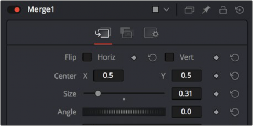
The Merge node includes a set of transform parameters in the Inspector that specifically affect the foreground input’s image. This makes it quick and easy to adjust a foreground image to match the background without requiring another node.
The Merge node transform controls that affect the foreground input’s image

NOTE: When connecting two images of different sizes to a Merge node, the resolution of the background image defines the output resolution of that node. Keep that in mind when you run into resolution issues.
NOTE: When connecting two images of different sizes to a Merge node, the resolution of the background image defines the output resolution of that node. Keep that in mind when you run into resolution issues.
NOTE: When connecting two images of different sizes to a Merge node, the resolution of the background image defines the output resolution of that node. Keep that in mind when you run into resolution issues.

You can use the Size slider to resize the foreground.

The final composite